Singlify Dolphin (v10) release
We are very excited to present you the Singlify Dolphin (v10) Release! As always, we want to thank our customers who helped us shape this new release by requesting new features and suggesting improvements. This has been, as always, the main driver for shaping our product roadmap.
 As you might have noticed, this release has a new kind of name! We decided to move away from the ‘seasonal’ naming and adopt a new naming convention, which you will hear more about below, or on our Release Webinar.
The Release Webinar contains a wrap-up and some cool demos of all the new functionality in this release, topped up with a sneak preview of the next release!
If you prefer written text, here’s the usual overview of the main new or improved features in this release.
What’s with the dolphin?
Since Singlify’s first launch in 2018, we have named our releases according to the main Salesforce releases (Spring, Summer, Winter). We realized that this is not very intuitive to our customers and employees on the southern hemisphere, and can be confusing in terms of timing.
So we embarked on a quest to find a new theme around our releases, looking for something fun, international, and reflecting our core values. And what is more fun, social and international than animals?
For our 10th Singlify release, the honour goes to the dolphin. Dolphins are highly sociable mammals that establish close links with other individuals of the same species and even with dolphins of other species sometimes. They seem to show empathic, cooperative, and altruistic behaviours. And those happen to be some of our customers’ key aspects too. What better way to kick off our new release naming!
Release highlights
Conditions Precedent/Subsequent
What is a Condition Precedent?
A condition precedent is an event that must occur before a contract can be fulfilled. Lenders will often require that borrowers provide certain documents and/or information (such as the company’s constitutional documents or current financial information) before they will make funds available.
What is a Condition Subsequent?
In a loan agreement, a condition subsequent is a condition that must be satisfied by the borrower within a set time period following drawdown. This condition could e.g. be used as a precondition for any subsequent Disbursements of new tranches of a grant or loan.
We now enable you to capture any condition on any object level in Singlify. This could, for example, be Contract-related Conditions, Investment-related Conditions, or another standard or custom object. Not only can the condition be captured, but we also enable you to link workflows, validations, email notifications and tasks to the conditions.
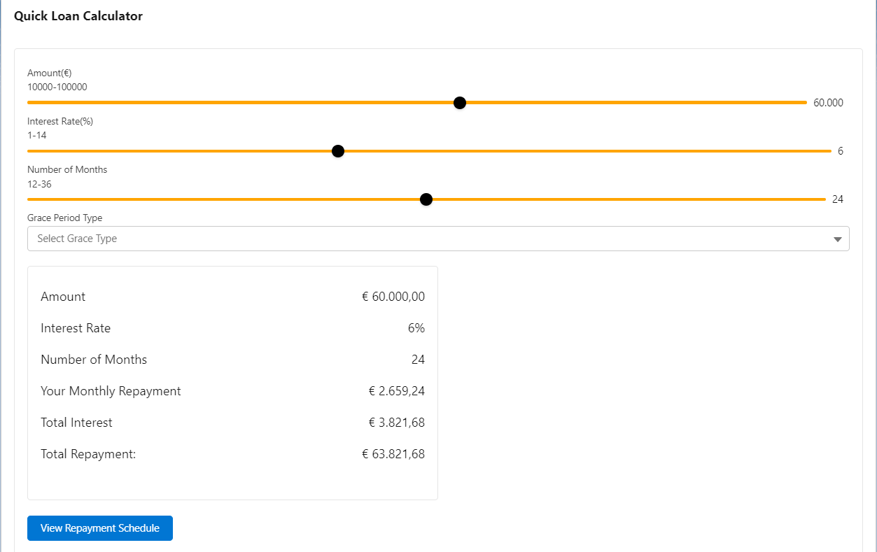
Quick Loan Calculator
Our brand new Quick Loan Calculator enables any customer to easily configure a quick way for both employees and (potential) clients to calculate the monthly instalment for any kind of loan product, and to get a preview of what the loan schedule will look like.
Behind the scenes, you can configure the options available to the end user, like pre-sets and minimum and maximum values for Loan Amount, Interest and Number of Instalments.
This is a much-requested feature and we are happy to finally help our customers replace outdated and inflexible calculators with this new tool.
30E/360ISDA Day Count Convention
Day count conventions are used to determine how interest accrues during the life of the loan. Next to the 3 types of day count conventions we already offer (30/360, Actual/365 and Actual/365L) we have developed a new variant called 30E/360 ISDA.
30E/360 ISDA is the most commonly used day count convention in Germany and many other parts of the European mainland and is a must-have for expanding into this territory.
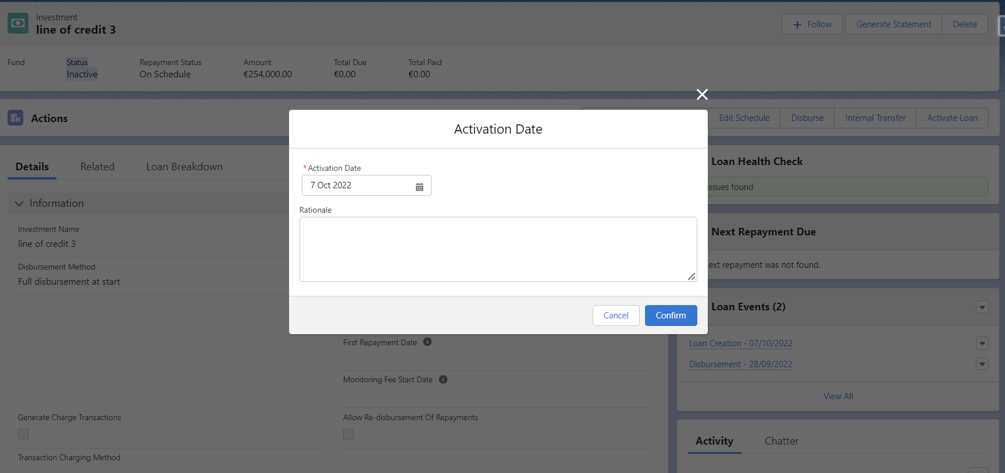 Loan Activation
We keep expanding our Line of Credit functionality with every new release. This time we add the ability to activate loans without doing a disbursement. This allows for the charging of Monitoring Fees to kick in right from the contract start date instead of just from the disbursement date.
Also the split between Activation Date and Disbursement Date allows for clearer reporting on loan status and loan KPIs.
Existing functionality becoming GA (Generally Available)
A couple of modules that have previously been in pilot or in beta mode are Generally Available from this release onwards:
Document Management
Some of the recent enhancements made include
- Better file previews
- Making fields from different objects available on the overview screen
- Combining fields from different objects on the screen
- Performance optimizations
Open Banking Integration
Our Open Banking integration offers advanced new possibilities to your origination process
- Offer customers the option to share their bank details
- Automatically authenticate a bank account, pull bank transactions and balances inside Singlify
- Verify the identity of the client
- Includes integrated analysis of client’s finance data
Mentoring Module
The Mentoring Module enables our customers to:
- Manage the mentoring needs of investees and connect them to the right mentor
- Manage the mentoring relationship, plan meetings and reviews
- Have a full view of all mentoring received by investees, and report on the impact of the mentoring on their business.
Salesforce Winter ’23 Release highlights
All Singlify customers automatically benefit from the generic Salesforce releases. The Salesforce’s Winter’23 release recently went live and as usual is packed with new features as well. We are in particular very excited about all Dynamic Related List Filters and, again, all the improvements made to Flows and Flow Orchestrator. Learn more about this release on the Salesforce Release Overview Page or jump right onto the release training on Salesforce Trailhead.
More features yet…
Like always, this is not everything! You can find the full list of new features on our documentation site at https://support.singlify.co.uk. If you don’t have access yet, send us a quick message at [email protected] and you’ll be set up within a day.