Singlify Spring ’22 release
We are very excited to present to you the Singlify Spring ’22 Release! As always, we want to thank all our customers who have helped us shape this new release by requesting new features and suggesting improvements. This has been and will always be the main driver for shaping our product roadmap.
Our mission is all about using technology to help our customers reach more clients who don’t have access to regular finance. This is what drives everything we do in the product.
We received a lot of positive feedback on our Release Webinar last Winter, so we’ve recorded another one for you. And just like last time, it contains a wrap-up and some cool demo’s of all the new functionality in this release, topped up with a sneak preview of the Summer ’22 release!
If you prefer written text, here’s the usual overview of the main new or improved features in this release.

Document Management – beta
Particularly as part of Loan Origination, our customers collect, review and store many different types of client documents. As the standard Salesforce functionality for this is limited, many customers have been requesting us to provide a better solution.
Therefore, we have built a module by which you can track and store files that belong to an Application or Investment (or any other object) in a structural way.
- Track different document types (signed contract, master service agreement, etc) so you know what kind of document was uploaded
- Integrated document versioning so you can be sure that there is only 1 current version per document
- Collect/share the documents on a client portal so your clients can upload and update their own documents
- Add your own custom fields to the document so you can track e.g. approval status or document ratings
This functionality is currently in beta mode. It is ready to be tried out by any customer. Contact us if you want to be involved.
Enquiry/Application Forms on Public Webpages
Online Enquiry and Application forms have been part of the investment application processes of most of our customers for most of Singlify’s existence. However, those forms were in many cases hosted on an external application, requiring technical integration with Singlify to get the enquiries and applications into the Singlify platform.
In order to make this process a lot easier, we’ve implemented the possibility to host Singlify-sourced Enquiry and Application Forms on any public web page. This enables you to capture enquiries and applications directly into Singlify, without requiring any integration, login or additional licenses.
Loan Locking/Pausing
In some cases loans can get in a situation where the state of a loan needs to be frozen, or where no fees of a certain kind should be charged during a certain period of time. E.g. when a loan is handed over to a third party for recovery purposes.
Our customers have asked us to support this in Singlify, so that all calculations happen automatically and the loan is protected from any unwanted changes or modifications.
We have therefore developed Loan Locking. When locking a loan, you have the option to suspend interest accrual, monitoring fees and late repayment fees (or a subset of these 3). You can also unlock the loan again at a later date if needed.
We made loan locking and unlocking available via Flow Actions, which means you can easily use it in your own automation and workflows.
 APR Calculation
The Annual Percentage Rate (APR) represents the cost rate paid each year on an outstanding total loan amount. It’s a standard calculation used by lenders designed to help borrowers compare different loan options.
In order to help our customers to provide the correct APR to their clients, we have added the possibility to automatically calculate the APR over a Singlify loan schedule. This can be done at any time, e.g. upon initial schedule generation or after any reschedule.
 Singlify Pulse
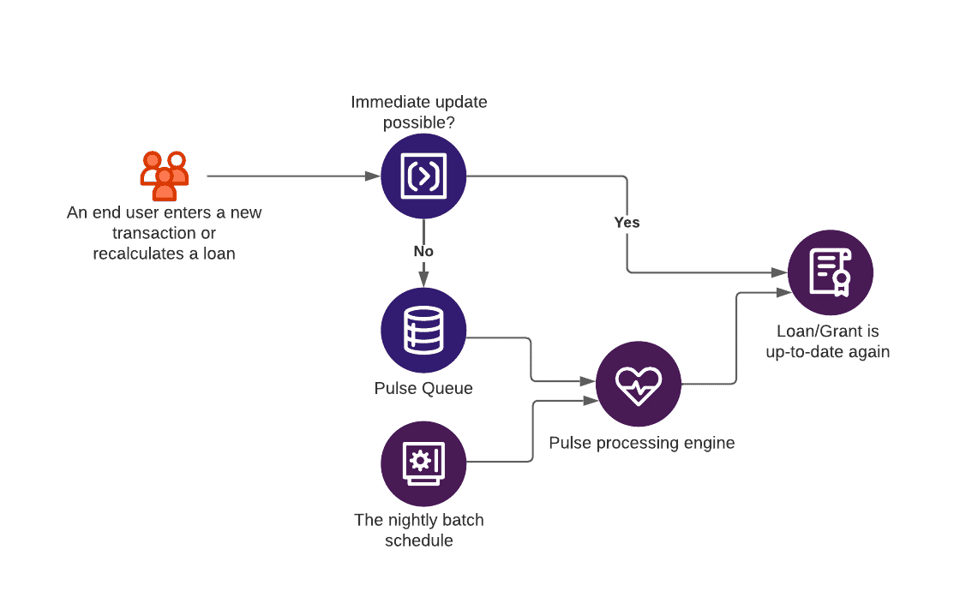
Loan and Grant Management processes typically are data- and calculation-intensive processes. This can have impact on the user experience, if not managed properly. For this reason, Singlify offloads a lot of number-crunching to asynchronous processing and to the Nightly Batch Job.
Singlify Pulse is a new mechanism that controls all of the background jobs that run as part of Singlify operations. This includes the nightly batch jobs that do interest accrual, data aggregation, and accounting runs. Moreover, Singlify Pulse also controls any background processes that run during business hours, such as transaction processing and bulk loan recalculations. By implementing Singlify Pulse, we gather all these processes under 1 hood and make sure they run correctly and completely for all of our customers, without interfering with platform limitations.
This functionality is currently in beta mode. It is ready to be tried out by any customer. Contact us if you want to be involved.

Mentoring Module
Mentorship is a vital part of social impact investing. Many customers have expressed the desire to integrate their mentoring efforts into Singlify, so they can have a complete view of their investees in 1 single system.
Therefore, we are providing a new Mentoring Module, which supports your mentoring and coaching efforts right within Singlify.
This new module enables our customers to:
- Manage the mentoring needs of investees and connect them to the right mentor
- Manage the mentoring relationship, plan meetings and reviews
- Have a full view of all mentoring received by investees, and report on the impact of the mentoring on their business.
This functionality is currently in pilot mode. We are building and designing the functionality together with a number of customers. Contact us if you want to be involved.
Salesforce Spring ’22 Release highlights
All Singlify customers automatically benefit from the generic Salesforce releases. As usual Salesforce’s Spring ’22 release was packed with new features as well. We particularly like the Workflow Rules to Flow conversion tooling and (yet again) the further enhancements to Flows, like Flow Trigger Order. Learn more about this release on the Salesforce Release Overview Page or jump right onto the release training on Salesforce Trailhead.
More features yet…
Like always, this is not everything! You can find the full list of new features on our documentation site at https://support.singlify.co.uk. If you don’t have access yet, send us a quick message at [email protected] and you’ll be set up within a day.